About
Ninur Tech is an agri-tech startup from Northeast India, building AI and IoT tools that help farmers detect crop disease, monitor soil, and get real-time insights. I joined as a Product Design Intern in February 2025, first revamping their website, then their flagship app.
ROLE
Product Designer
TIME
2 Months
TEAM
Me + 2 Devs + 1 PM
All the agri-tech stuff is fine But….
What exactly Ninur does?
Ninur's Farming Methods
AI-Powered Disease Diagnosis
Take a photo and instantly diagnose plant diseases with AI, getting prescription/action tips in seconds.
Instant Soil Testing
In-house soil tester provides real-time soil nutrition status (NPK, pH, etc.) directly on the app.
Hybrid Marketplace
Relies on local markets and intermediaries, often with little access to real-time price data.
Modern Inputs
Modern agricultural inputs such as fertilizers and other farm supplies.
Modern Record Keeping
Digital, ongoing, with analytics
Modern Community Support
Digital farmer community, expert support
If everything was alright…

Then Why would they hire me ?
-
-
-
-
-
-
-
-
-
-
-
-
-
-
-
-
-
-
-
-
-
-
Problem
-
-
-
-
-
-
-
-
-
-
-
-
-
-
-
-
-
-
-
-
-
-
Looks like they had a couple of problems…
A leaky app and a quiet website

Ninur Website
The legacy website wasn’t generating the expected traction or conversions, as highlighted by their tech team’s analytics.
They wanted to highlight new features on the site, which called for a dedicated section and a refreshed, more engaging website design.

App
The flagship app wasn’t performing as expected, and farmers - the core user were sharing mixed reviews that revealed clear gaps in the experience.
Several valuable features that could have strengthened the product were still pending, as the previous team couldn’t release them due to various constraints.
This is what we are going to explore about in this case study
HMW Brief
(this was given to me by the PM)
How might we redesign the app around the farmers it was built for — not the urban user it
drifted toward?
Project Timeline
Week 1

Research
Primary research analysis
Secondary research
Literature Review
Week 2-4

Assess
Understanding the userbase
Heuristic Evaluation of the app
Competitive analysis
Week 4-5

Ideate
Team feedback
Concept ideation and pitching
Understanding the constraints
Week 6-8

Design
Crafting a small design system
Designing and prototyping
Handoff
Before diving into what we should make or not, I wanted a clear and structured idea of what's exactly happening and why was it happening. It was tough for me to travel to Arunanchal Pradesh during college so the business team came out with a survey that they conducted for this app when they were testing it .

Before anything grows, he's down in the dirt, feeling it with his hands. What is this soil holding? Will anything even take root here?
FEELING
Curious but unsure. Half-guessing, hoping he's reading the ground right.
INSIGHT
DeHaat actually gets well here, it's the only app that'll test his soil, and it watches the weather for him too.
Here's what came out from the Audit.


Only two languages — and honestly, the wrong two
1
PROBLEM
You get English or Hindi. That's it
2
WHY IT HURTS
The brief targets farmers in Arunachal. Hindi isn’t even their first language, most speak Assamese or a tribal language. So we’re offering an Arunachali farmer two options, and neither truly fits them. That isn’t a minor oversight; it’s the app silently deciding who it’s actually for.
To check out the full audit:
Click here
STORYTIME
Meet the farmer ready to bring his work online and walk through his day from start to finish.
The crop is coming along, growing well and filling out, but it’s not there yet.
FEELING
Cautiously good and happy with how it's coming, but not relaxed yet, because he knows this is when things can quietly go wrong.
INSIGHT
Plantix and DeHaat do here well. AI advice, doubt assistant, crop tips when something's nagging at him.

He pulls up the app, points the camera at the leaf, and waits to hear what's wrong.
FEELING
Hopeful and focused. Finally, a tool that might just tell him what he's looking at.
INSIGHT
This is where they all finally wake up. Plantix is the strongest here Scanning and a proper disease database, real feedback.


The scan is done. He’s now reading the results, figuring out what the disease is and how severe it is before taking any action.
FEELING
Trying to make sense of it. A mix of relief that he has an answer and a bit of overwhelm at what do I even do with this?
INSIGHT
Plantix gives the most detail, Plantin the most support but all of them explain by making him read, so the "best" app is really just the best at burying him in text.
He now knows what it is, so he heads to the shop for the cure and gets the right bottle at a price he can trust.
FEELING
Determined, then a little stranded and ready to fix it, no obvious place to actually do it.
INSIGHT
BigHaat and DeHaat do this well — a real marketplace, and someone to talk to (DeHaat even puts an expert a WhatsApp away).

The crop pulled through. Now it’s market day, the basket is full, and the only question left is its worth.
FEELING
Happy and proud, but a little guarded — he grew the thing, and now he doesn't want to get lowballed on it.
INSIGHT
DeHaat and BigHaat do this well — both give him mandi prices and a place to actually sell.

Approximately eleven seconds of panic later…
Roughly one deep breath later…
A few waterings later..
A few uneventful weeks later…
One anxious errand later…
A few moments later…

He has the cure in hand. He treats the crop, spraying or applying it, and waits for it to turn around. Slowly, the plants recover.
FEELING
Hopeful but watchful as he's done what he can, now he's waiting to see if it takes, half-anxious it might not.
INSIGHT
DeHaat's expert-on-WhatsApp could help here if he asks; Plantix has some advisory in its database. But nobody really follows through on the treatment.
One whole season later…
All that research wasn’t four separate exercises; it was one long answer to a single question, who is this actually for? By the end, the answer was obvious: this is him.

Our Ideal User

Hage Tabyo, 36
Hage grows paddy, millets, and some vegetables in the Ziro Valley of Lower Subansiri district, Arunachal Pradesh. He has been farming since his teens, roughly 20 years, reads slowly, gets by on a basic Android phone, and works with a patchy signal.
HIS GOALS
Get the cure, not just the name of what's wrong.
See or hear it, don't make him read it.
Diagnose a spot on a leaf by observation alone, without being a scientist.
Know what to do this week.
Get help that fits his location: local crops, local databases, offline connectivity, and a nearby physical shop.
Move through the app without getting lost.
Buy the fix where he found the problem.
WHAT'S IN THE WAY
Every disease note asks for a next action, but the apps only give a label. He learns the label, not what to do.
It's all text; he reads every word and gets trapped, paragraphs where he needed a picture or a voice.
Apps are organized around science and text, not around the part of the plant he's actually looking at.
Nothing describes his crop's stage plainly; the advice never matches the plant's current condition.
The app assumes an always‑online, urban, English‑speaking user. It offers only Google login and house‑plant imagery, none of which reflect his world.
The store is just a list, no filter, no product page, and prices he can’t trust. The trail goes cold when he’s ready to act.
-
-
-
-
-
-
-
-
-
-
-
-
-
-
-
-
-
-
-
-
-
-
-
Research
-
-
-
-
-
-
-
-
-
-
-
-
-
-
-
-
-
-
-
-
-
-
-
First of all I reviewed all the primary surveys conducted by the product and development teams about the app. These insights helped me understand the user base more deeply — what they expected from the product, what they valued, and which parts of the experience were currently creating bottlenecks for them.


And 20+ more such pages of interviews….
What the mapping actually told me…..
TAKEAWAY 1
The app named the problem. Farmers wanted the cure.
Each disease note asked for the next action, not a better label; this was the clearest signal on the wall.
TAKEAWAY 2
Text was the wrong medium. Farmers wanted visual aid.
The repeated request for pictures instead of paragraphs wasn’t a styling preference; it reflected a persona gap in the output.
TAKEAWAY 3
Place and connectivity were the context.
Offline access, local crops, location-aware advice, and directions to real shops all pointed to a grounded, place‑bound user, the exact user the app had overlooked.
This gave me the surface issues. The next step was clear: a thorough UX audit to dig into the app and understand what was holding it back.

UX Audit
I began by immersing myself in the product — understanding how the app functions, exploring every existing feature, and mapping out the overall experience.
&….
I also spent time in multiple discussions with the CEO, the dev team, and the product manager to learn how they currently view the product and where they envision it heading. These conversations helped me gain clarity on the product’s vision and the full spectrum of features planned for the future.

The analysis
The analysis was a bit tough because a lot of those survey answers were filled with gibberish text since the user base wasn't just Millennials but Gen X as well . So i had to filter a lot of data to find what was relevant for me and then group them accordingly


Raw Synthesised Data
grouping them together with similar affinity
(basically affinity mapping)

Ninur App
An all-in-one platform that helps farmers manage their crops, monitor diseases, and track soil health through smart, data-driven solutions.


What the audit told me…..
TAKEAWAY 1
The product was built for a user who doesn't match the one it's meant to serve.
The design assumes an urban, English‑speaking user. With only Google logins and houseplant visuals, the app suffers a major identity crisis.
TAKEAWAY 4
The store doesn't behave like a store
It's just a list of items, no filters, no product pages, and inconsistent pricing. It looks like a shop but doesn't function as one, making it hard to trust or actually buy from.
TAKEAWAY 2
A lot of the app feels half-built.
The app hypes major features before they exist. Users look for what was promised, only to walk straight into an empty room.
TAKEAWAY 5
The app doesn't look like one app.
The visual style is inconsistent: flat pastels clash with glossy 3D icons, and fonts and buttons are mismatched, making the app feel like a collection of random screens assembled by different hands.
TAKEAWAY 3
Things are scattered, so the app is hard to read
Major features are buried in Settings where nobody looks. The navigation icons are blank, and unrelated items are crammed onto the same screen.
TAKEAWAY 6
The product grew without a product layer
Built developer‑first, yet nobody owned the full experience. As a result, the app feels inconsistent because it was assembled piece by piece without a single vision.
The audit and affinity mapping told me exactly what was broken inside the app. To fix it, I stepped back, examined the broader landscape, and stopped focusing solely on our screens. I began researching the industry and competitors to see what they were already doing.
Literature review
Well, I couldn't get to a farm, so I read instead. Design papers on how low-literacy users actually read a screen, plant pathology on how diseases get classified, agronomy on how fast soil changes and various stages and part of plants.


Things that literature review pointed out..
TAKEAWAY 1
How low-literacy users actually navigate
Low‑literacy users don't scan; they read every word. If they encounter a dead end, they're trapped. That's why this design cannot include deep menus or hidden traps.
TAKEAWAY 4
Crop stage — what stage the plant is in now
The research applied a scientific seven‑stage model, aligned it with a farmer’s actual language and observations, and tied each stage to a clear weekly action. For this user, a stage is only useful if it tells them what to do that week.
TAKEAWAY 2
How crop disease actually works: types, causal agents, prevention
I quickly learned that “plant disease” isn’t a single category. It divides into fungal, bacterial, viral, and environmental issues, and each follows completely different rules.
TAKEAWAY 5
Crop stage — what stage the plant is in now
The research showed we can bypass reading. Voice input lets users request exactly what they need, and an instant audio‑visual cue on every tap ensures they never hit a dead end.
TAKEAWAY 3
Diagnosing by Sight, Not Science
Farmers diagnose problems by what they can see, such as a strange spot on a leaf, rather than the invisible science behind it. Building the app around plant parts lets them identify issues naturally, without requiring them to be scientists.

Looking at our competitors
Before touching Ninur's screens, I wanted to know who else was speaking to the farmers. I examined four apps. Only one, Plantix, was a true rival, doing the same job for the same users. I studied the other three to see what they did right and where they went astray. Here's what each taught me.
Plantix
Direct
ABOUT
All-in-one farmer app to diagnose diseases and manage different crops.
PRIMARY FOCUS
Diseases and other crop management features.
FEATURES
Fertilizer calculator
Disease database
Field profit estimate
Disease identifier (scan)
Community
Diagnosis + feedback
Doubt assistant
Weather + sowing forecast
Dehaat
Direct
ABOUT
Farmer-focused app to manage crops, treat diseases, and apply for schemes
PRIMARY FOCUS
Balanced, all-round info to manage day-to-day activities.
FEATURES
Schemes & insurance info
Soil testing
Marketplace
Disease identification
Weather alerts
Community
Botanist help
Expert calls + whatsapp
AI advice
Mandi price
BigHaat
Direct
ABOUT
All-in-one app to diagnose diseases and buy medicines and products for crops.
PRIMARY FOCUS
E-commerce and selling products, with crop care too.
FEATURES
Fertilizer calculator
Disease database
Mandi price
Vedika community
Disease identifier (scan)
Marketplace
Diagnosis + feedback
Direct contact for help
Weather + sowing forecast
Plantin
Indirect
ABOUT
Plant & crop management app to get plant info and record history.
PRIMARY FOCUS
Plant care and management — general audience, not farmers.
FEATURES
Blogs & plant info
Plant management
Disease identifier (scan)
Botanist help
AI advice

Something's off. The leaf looks wrong, so he leans in for a closer look, feeling a slight sinking in his stomach.
FEELING
Things were going fine a second ago, now there's that quiet worry of is this bad, or am I overthinking it? He doesn't know yet, and not knowing is its own kind of stress.
INSIGHT
None of them do. Plantix, DeHaat, BigHaat, Plantin — every one of them assumes he's already spotted the problem and just wants it scanned.
-
-
-
-
-
-
-
-
-
-
-
-
-
-
-
-
-
-
-
-
-
-
Ideation
-
-
-
-
-
-
-
-
-
-
-
-
-
-
-
-
-
-
-
-
-
-
-
So, after all that research…


Problem Reframed
How might we rebuild Ninur around the farmer it was always meant to serve — an app that shows him what to do instead of just naming what's wrong, speaks in sight and voice instead of text he struggles to read, keeps working when the signal drops, and stays with him across his whole journey rather than meeting him at a single scan?

Laying out some guidelines
DESIGN PRINCIPLES
Hage reads slowly so, we can not lean on text. It has to be pictures first .
He cares about the cure and not exactly what the disease is after recognizing the disease.
Trying to impress the farmer without usability will just overwhelm him
Every screen should be goal oriented and should work on a patchy signal
PROJECT DECISION
The journey map showed Ninur missing across almost the entire farmer's day so, the gaps weren't the hard part, picking them was.
The team made a call: leave the selling stage alone for now, focus on the crop's life, not its sale. So that's the boundary.
WHAT WE FOCUSED ON
Visual restructuring comes first. The app's scattered, and nothing else lands if the base is broken.
Scan & diagnosis the one place Ninur already shows up. Make it better, and carry it past the disease's name to what to actually do.
Spotting helps him catch trouble early, before it costs him the crop. Nobody does this today.
Farming through growth & treatment stay with him across the season, not just at the scan.
The soil tester a new in-house device on the way. Early days, but it lets him read his field before anything goes wrong.

Starting out with ideas
Honestly, I just brainstormed hard first. I took the problems we'd found and went wide on each — a whole board of how-might-we questions before I committed to a single one.


Brainstormed upto 20+ distinct ideas
Disease breakout alert
Community section
Offline disease packages
Step by step disease breakdown
Online shopping
Basic AI experience
Visual restructure
Fertilizer calculator
Smart Spraying advisor
Offline shopping
Push notifications
Ideas we went with

Impact vs Effort for all the ideas.
Initially I pressure-tested them with the people who knew the real cost and stakes. I didn't score these alone.
DEV TEAM
What's buildable now vs. what stalls on the dataset.
PRODUCT TEAM
Which ideas help Hage and position Ninur.
CEO
The shape of the app, what ships first
The ideas scored and ranked
IDEA
IMPACT
EFFORT
PRIORITY
Discovery, diagnosis & treatment
Step-by-step cure — the head-on Plantix hit
P0
Crop management
Fertilizer, pest alerts, stage advice
P0
Visual restructure
The base everything else sits on
P0
Offline mode
Downloadable disease folders, no signal
P0
Onboarding & FTUX
Calm, conversational first run
P0
Soil-tester device sync
Real edge — gated on hardware
P1
Store and online products
Place-aware as well as online capability
P2
Reduced help chatbot
Plain replies — agentic version blocked
P3
AI agent / planner / predictor
High impact — parked on the dataset
P4
The dataset was the wall. The agent, planner, and predictor each scored a 4 on impact, but I parked them anyway because delivering on time mattered more than delivering everything.
-
-
-
-
-
-
-
-
-
-
-
-
-
-
-
-
-
-
-
-
-
-
-
-
-
Design
-
-
-
-
-
-
-
-
-
-
-
-
-
-
-
-
-
-
-
-
-
-
-
-
-

Wireframes
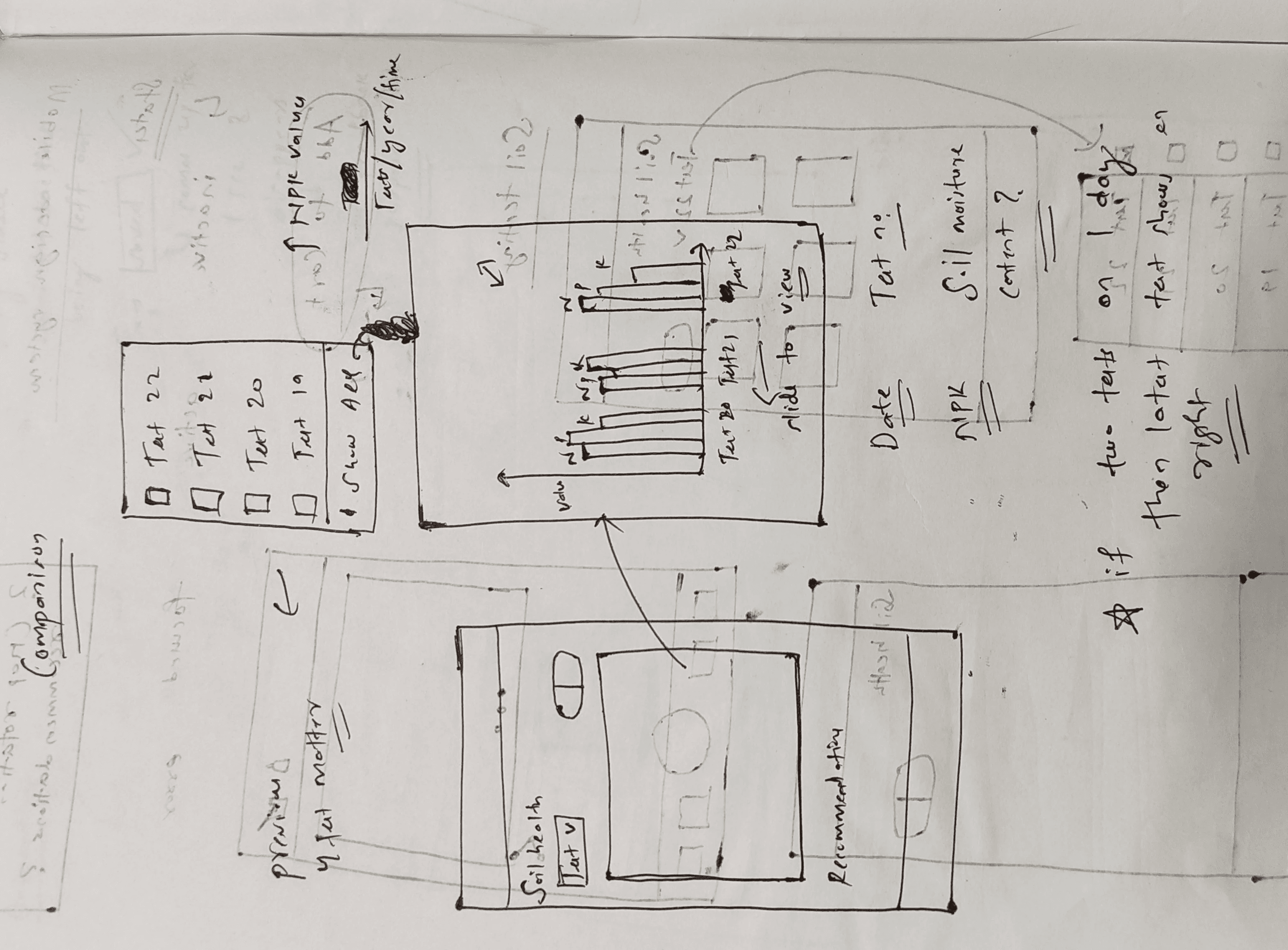
With the ideas ranked, I put them on paper, using only a pen because speed mattered on this timeline. These are the rough drafts, reworked iteration by iteration.




I built what the app needed to ship: a stylesheet and a state‑first component library. A fully documented design system wasn't the priority, consistent, reusable UI that worked for Hage was.
Introducing Ninur


What I built is the base, a stylesheet and structure meant to grow into a design system as the product matures. And since I set it up with variables, light and dark mode both come for free with little tweaks, ready to scale whenever they need it.

~15 min read
Topic 1
Topic 1

App Flow

While working on the app, I improved the logo and established a proper structure for the design language. Browsing the internet, I discovered several ideas and settled on Airbnb style realistic icons, appreciating its realistic yet simple design.

OLD LOGO

NEW LOGO

To replicate the Airbnb 3D‑style icon, I rebuilt it and wrote JSON code that yields similar results. This allows me to use the icon for Ninur and assist the developer team. I also established a proper context and structure so they can generate any icon in the future.
Here is the code
Major User flows and decisions
NEW ONBOARDING FLOW
DIAGNOSING THE DISEASE AND TREATING IT


Hage notices something wrong with his crop. He opens Ninur, taps the camera, and the scanner opens. He frames the leaf and clicks. The app returns a diagnosis within seconds.
The home screen has one job: show Hage everything that matters without making him look for it. It is divided into three sections.
Weather tells him whether today is safe to spray. Farming puts Disease Doctor, My Crops, and Soil Testing just one tap away. Recent Detections surfaces his last scan, so follow‑ups don’t require memory.
Nothing hidden. Nothing competing.
REASONING
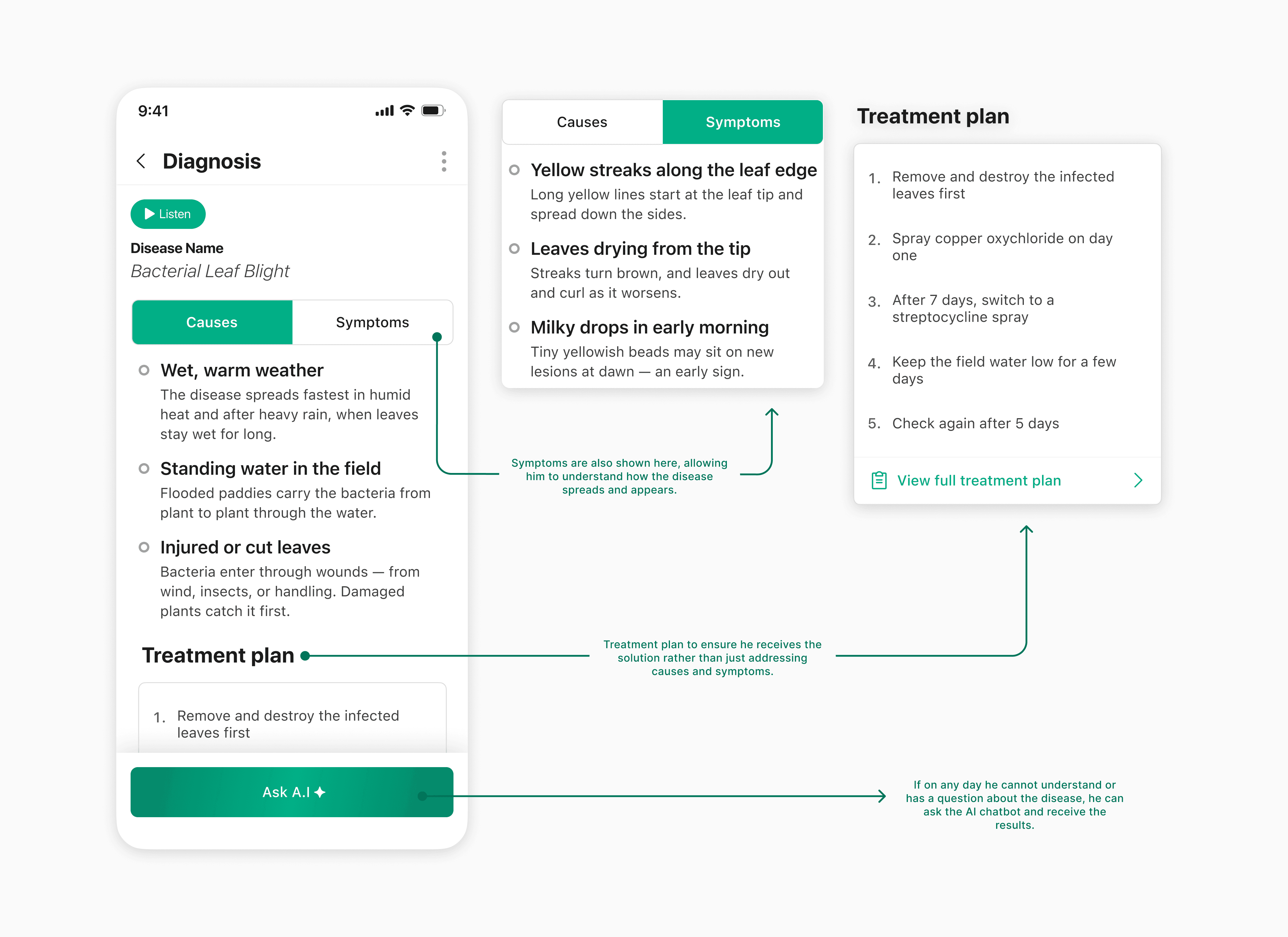
Hage doesn't need a medical report. He needs to know what's wrong, whether it's serious, and what to do about it, in that order.
That's exactly what this screen provides: severity up front, a listening feature so he doesn't have to read, causes and symptoms to confirm he's looking at the right issue, and a treatment plan he can actually follow. If he's still lost, Ask A.I is right there.
REASONING

A treatment plan that stops at steps assumes the farmer can read and interpret each one correctly, but Hage might not.
Each step pairs an action with its visual representation, its field and tools. If reading remains a barrier, the audio plays in his language. He selected this during onboarding, and the app remembered.
REASONING
FERTILIZER CALCULATOR

Fertilizer calculations are easy to get wrong. This tool does it for him: crop and soil values, plot size in, bag count out.
It doesn’t stop there. The results link directly to products he can actually buy, and his calculation carries forward so he never starts from scratch.
REASONING
We replaced the Google‑only login with a simple phone OTP and added the local languages that farmers actually speak.
FIXING THE LOGIN ROADBLOCK
We replaced random data grabs with two simple questions, what they grow and where they live, to instantly personalize the app.
DATA THAT ACTUALLY MATTERS
OFFLINE MODE FOR DISEASES

REASONING
A disease flagged nearby isn’t useful if Hage learns about it a week later. The tracker shows regional outbreaks in real time and lets him report what he sees with a single tap, no form required.
Each scan saves automatically, so Hage's phone doesn't fetch data it might not load. He can also browse and save disease information by crop before the season starts, ready for times when the signal is unavailable.
STORE - BOTH ONLINE AND OFFLINE

REASONING
The Store splits into two paths, online delivery or a local dealer. Both use the same horizontal card layout, so Hage never feels like he’s in a different app.
Online has a category section at the top, Fertilizers, Pesticides, Herbicides, allowing him to filter without typing. The product page follows the same structure as the dealer page: image, key details, one primary action. He learns the pattern once and it works everywhere.
The one thing the dealer page has that the online store doesn’t is Udhaar: buy now, pay after harvest. That’s how rural commerce already works; the app simply surfaces it.
-
-
-
-
-
-
-
-
-
-
-
-
-
-
-
-
-
-
-
-
Results and Learnings
-
-
-
-
-
-
-
-
-
-
-
-
-
-
-
-
-
-
-
-
What shipped, and what it taught me
The design shipped, the Ninur team adopted it and built their model and app on top of it. I don’t have post‑launch numbers, so instead of manufacturing metrics I’ll share the learnings and what I’d measure next.
SYSTEMS
A style sheet built to scale
A full design system would have blocked the team, so I handed off a lightweight UI kit — consistent enough to grow, fast enough to build on today. Match the artifact to the team's stage.
CONTENT
Photos over illustration
Real photos read faster and AI-generate at scale — a cheap, expandable pipeline
PRODUCT
Beyond screens — ideation & strategy
I worked with dev and product to shape engagement strategies, not just visuals. On a small team, the interface should follow product thinking.
CRAFT
A logo that scales
Not a rebrand — a rework into a mark usable across platforms. Refine, not redo.
USERS
Ruthless simplicity
Fewest steps, least reading. Success was a farmer getting through without getting lost.